
Adobe Illustrator 9
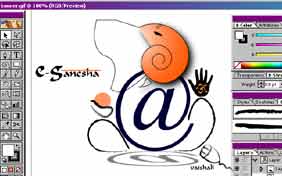 In
the world of vector graphics, Adobe Illustrator is the tool for most
professional designers. And it has been my favorite too. That's because
for years, its been the best for creating vector-based illustrations.
And all while competing with rivals like Macromedia's Freehand (Product
Review, it@tt, 29 May 01), Corel's Draw and even Deneba's Canvas.
In
the world of vector graphics, Adobe Illustrator is the tool for most
professional designers. And it has been my favorite too. That's because
for years, its been the best for creating vector-based illustrations.
And all while competing with rivals like Macromedia's Freehand (Product
Review, it@tt, 29 May 01), Corel's Draw and even Deneba's Canvas.
Though most of us users believed Adobe Illustrator was already the perfect illustration program, Adobe evidently saw room for improvement. By recognizing the mass migration of designers from print to online media, Adobe rebuilt Illustrator to cater to the needs of this pixel generation.
Previous Illustrators' may have been powerful enough for print projects involving posters, brochures and package design. But when it came to web graphics there were very few usable features. Now Version 9 addresses those shortcomings. It contains a (now) familiar interface to avoid disorienting current users. And adds new features addressing changing industry needs.
Illustrator 9.0 has improved image mapping capabilities. But there still no image slicing or rollover button creation. Like Photoshop, Illustrator now offers drop shadows, feathering, inner and outer glows for easier button creation. The Effects menu also allows you to build your buttons as Live Shapes. These are a special type of Live Objects and allow you to define a shape to surround text. Live Shapes helps cuts down on the time spent in creating Web page buttons. Now if you edit the text on a button, the button automatically re-sizes to match the length of the new text.
The new SVG export command ensures that your entire Web page remains visible when site visitors resize their browser windows. The scale of the layout will conform to the frame; a relief to designers like me. Illustrator 9 also uses Adobe PDF as its core file format. This allows for easy import and export of files created in Illustrator, without damaging complex layouts or losing file features such as fonts. The PDF format also includes settings for font embedding, colour management, compression, and security to ensure high-quality printing.
You can also now select pixels as a unit of measure (unavailable previously). Choose the Pixel Preview from the View menu to can see how your vector artwork renders as rasterized artwork. When in Pixel Preview, objects automatically line up with the nearest pixel edge in the document. You can even create and edit artwork.
Illustrator 9.0 also offers file optimization previews to help you find the perfect balance between image quality and file weight. And lets you optimize graphics when you export them, offering up to four simultaneous views of your file displayed with different colours and file formats for different browsers and modem speeds. You can handpick new colours and change the image size directly within the export window.
Illustrator's Colour menu offers a Web-safe RGB option. Double-click the foreground or background colour in the toolbar, and the familiar Colour Picker from Photoshop appears. As you scroll through the RGB values, Illustrator snaps to the closest Web-safe colour match. Now isn't that amazing???
Were you to select Object/Path/Simplify, Illustrator 9.0 automatically removes extra anchor points from a path without changing the shape of the path. The result is a simple and smooth path shape and a reduction in overall file size.
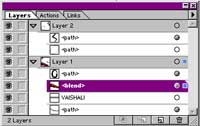 The
new Layer Palette makes managing objects easier than ever. Layer
management now has the added ability to nest related layers and also display
thumbnails of layer content. You can apply transparency to layers and
objects. Choose from any of 16 blending modes like Normal, Multiply, or
Screen and set the transparency percentage. Clipping masks can then be
created to define the uppermost object as the outline through which all
other objects on that layer are seen. Opening a Photoshop file in Illustrator
9.0 preserves masks, blending modes, and transparency. You can also convert
layers to separate Illustrator objects and visa versa.
The
new Layer Palette makes managing objects easier than ever. Layer
management now has the added ability to nest related layers and also display
thumbnails of layer content. You can apply transparency to layers and
objects. Choose from any of 16 blending modes like Normal, Multiply, or
Screen and set the transparency percentage. Clipping masks can then be
created to define the uppermost object as the outline through which all
other objects on that layer are seen. Opening a Photoshop file in Illustrator
9.0 preserves masks, blending modes, and transparency. You can also convert
layers to separate Illustrator objects and visa versa.
Illustrator 9.0 also offers new features that make it easier to create artwork for Flash. With the Release To Layers command in the Layers palette, you can automatically generate a separate layer for each object. You can then export the entire artwork as a single SWF file, export each layer to a separate frame in a single SWF file, or export each layer to a separate SWF file. This capability is a great advantage for Adobe users moving into Flash work.
Since Illustrator is now based on a PDF format, Acrobat 4.0 and higher will read its .AI format. You no longer have to export or save your Illustrator files as PDF files. In fact, you can move files from Illustrator 9.0 to Acrobat and back without compromising quality.
A less astonishing but equally useful addition is Illustrator's ability to let you export and save your files in virtually any format, including Illustrator, EPS, PDF, SWF, SVG, GIF, JPEG, PNG, Photoshop (including layers), BMP, PICT, PCX, PXR, TGA, and TIFF. It can read files saved in Illustrator (any version), EPS, PDF (one page at a time), Photoshop (versions 2.5 and later), SVG, Macromedia FreeHand (versions 5.0, 5.5, 7.0, and 8.0), CorelDraw (versions 5.0 through 8.0), BMP, GIF, JPEG, PNG, Kodak Photo CD, PICT, PCX, PXR, TGA, and TIFF formats.
Does it seem to good to be true? To judge for yourself, download the trial version from the company's site (24 MB, Windows, 30-day demo with save/export/print disabled, download from http://www.adobe.com/products/illustrator/tryreg.html).
Vaishali
Singh
[email protected]
Other Articles
CareerCorner
| ChiefChat
| CoolStuff | Mailbox
| ProductReview
|
SiteScan
Techtalk
|
Tips
| VirusWatch
| Webware