
Internet Explorer 6
 I
for one have been eagerly awaiting the release of IE 6 Preview. I was
so disappointed when Microsoft inexplicably last Saturday (24 Mar 01)
stopped the beta download for the English version. It did reappear 48
hours later, but I felt a trifle cheated since I like to be the first
in my peer group with the latest software. Anyway, there's quite a few
new bits to old faithful IE. Some of them what you always wanted. Other
that are very Netscape oriented. Hate it love it, but take a look leastways!
I
for one have been eagerly awaiting the release of IE 6 Preview. I was
so disappointed when Microsoft inexplicably last Saturday (24 Mar 01)
stopped the beta download for the English version. It did reappear 48
hours later, but I felt a trifle cheated since I like to be the first
in my peer group with the latest software. Anyway, there's quite a few
new bits to old faithful IE. Some of them what you always wanted. Other
that are very Netscape oriented. Hate it love it, but take a look leastways!
IE6 tries to bring you closer to what WindowsXP will look like. If you still use Windows 95, don't read any further because IE6 does not run on any version of Windows 95. The minimum platform is Windows 98 or Windows NT 4 with SP-6. And if you already use Win ME or Win2K, the revised interface blends in nicely. On Win98, only the browser looks good; the rest is same old.
The most important features in IE6 appears to be the revamped privacy features. The browser can now track a Web sites' privacy ratings. This implementation uses to (to-be-ratified) P3P (Platform for Privacy Preferences) standard from the World Wide Web Consortium. P3P (not to be confused with PHP, a HTML-enabled language processor) let's you view a site's rating and also provide feedback on your experience. IE 6 display a tiny icon in the status bar by default (medium setting). In the High setting, the browser won't open any sites without a P3P privacy policy. So avoid this setting if you want to actually view any content online.
Cookie-handling has been improved. The browser can now reject or approve cookies. It can be configured to reject web-tracking (the so-called Web bugs) cookies. But if you really want to control what does and doesn't arrive on your hard drive, consider WebWasher.
IE6 takes a bit from the MSN Explorer (see it@tt, 19 Sept 00) in term of features, and look and feel. You can also download a larger, more colourful toolbar. But this is in beta and should be avoided.
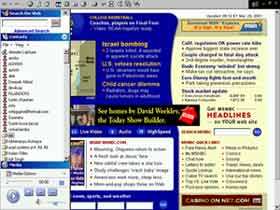
The left-hand sidebar has been considerably augmented. It now has a Search button that uses the MSN Web Search. This followed by your choice of Contacts (MSN Messenger buddies and email contacts), Favorites, History, System Folders and MSN News. You can also add bars for Expedia travel services, MSN Calendar, MSN Slate and iHarvest.
The bottom of the Personal Bar contains a cut-down Media Player. This replaces the previous Media Bar. However I couldn't get it to directly play an MP3 file on my PC. But it did offer to load Windows Media Player.
The biggest downer about the Personal Bar is you can't disable inclusion of the default properties. Or expand the size allocated to each area.
Selecting Contacts now automatically loads MSN Messenger (if installed). Outlook Express does not load automatically. But clicking on an email ID will open a new mail window. On Win2K and ME, this shortcut works fine. But on older platforms like Win 98 or NT it sometimes locks up your PC. To get around the bug, load MSN Messenger and Outlook Express before you run IE6.
Microsoft claims that the final release of IE 6 will have the best, most complete standards support of any browser. This preview had some issues with Cascading Style Sheets and the Document Object Model.
Outlook Express' attachment handling has been strengthened. You can either not load/open an potentially dangerous attachment. Or the app can warn you that a danger exists.
The new image toolbar pop-up when you place the mouse pointer over an image on a Web page. This shortcut bar lets you save the image, print it, send it by email or just open your My Pictures folder. There's also a small icon that pops up at the bottom right of the screen. This lets you resize an image to fit the window size. All in all, image handling is sooo cool!
One serious problem area with previous IE versions was the ease with the program could become corrupt. And start generating all kinds of errors. IE5 did partially address this problem by offering a repair option (except for Win2K and ME users). IE6 takes this a step forward with an Error Reporting dialog that provides fault collection. This offers to extract information about the problem and upload the data to Microsoft for analysis. You can view the details and then choose to report or discard the information. Known problems are linked to a specific Service Pack, hot fix or Knowledge Base article.
So what are you waiting for. Go download a copy yourself today (http://www.microsoft.com/windows/ie/preview/download/default.asp). I also suggest pay little attention to the warnings about Beta software. Netscape 6 was released to users and had far more, extremely serious bugs.
G
Menon
[email protected]
Other Articles
CareerCorner
| ChiefChat
| ProductGuide
| ProductReview
SiteScan
|
Techtalk
| VirusWatch
| Webware