
NETCAPTOR 6.2
 Most
of us have experimented with a variety of Internet browsers. The most
common are Internet Explorer (because it's bundled with Windows), Netscape
Communicator (because ISPs include it on their registration CD-ROMs),
NeoPlanet (because it looks cool), and Opera because its different. And
then there's NetCaptor.
Most
of us have experimented with a variety of Internet browsers. The most
common are Internet Explorer (because it's bundled with Windows), Netscape
Communicator (because ISPs include it on their registration CD-ROMs),
NeoPlanet (because it looks cool), and Opera because its different. And
then there's NetCaptor.
I admit I have been a member (founding perhaps) of its Fan Club. And introduced many users to the joys of this (then) wonderful alternative to the big two. What I liked about the fledgling was it didn't need IE installed. And used built-in Windows controls. It has really improved over the past 3 years or so.
NetCaptor (NC) is available in two versions: ad ware and paid ($20). The former is the only way the developer can get someone to pay for product development. The upside is that there's no longer a large ad window. The downside is the Web3000 Network ads are terribly intrusive. The paid version doesn't have any ads.
I'm the first to use free software, but hate Web3K so much I paid the registration fee. I would like to clarify that ads per se are not an issue. Many of the great sites I visited since 1998 were because they advertised on NetCaptor!
As to using NC, well in a nutshell its fast, easy and because it supports multiple windows, and doesn't make the Taskbar a clutter bar. It has now has added refinements including direct menu access to Security settings. You can now quick enable or disable JavaScript, ActiveX, and cookies. The QuickSearch (first introduced in IE4) lets you search straight from the Address Bar. Built-in search engines include AltaVista (av), Google (q), Yahoo (y), DejaNews (dj) and even eBay (eb). You can also add your own engines.
NC doesn't include its own email, news group or chat client (unlike Opera 5). Instead it uses the IE defaults. Since NC actually uses the Windows API to run many tasks, don't be surprised to see an IE sub-menu pop-up. This however makes NC's learning curve impressively flat. In previous versions of NC, download manager integration was spotty, with the notable exception of GetRight. NC has now been tweaked to accept NearSoft's Alligator, Go!Zilla, Mass Downloader, NetAnts, FlashGet, ReGet and Net Vampire.
To get started, double click the icon to open NC. The first time you run it, NC will automatically open the developer's page to show you the Release Notes. The software can also be configured to open with a blank page, your (IE) home page, the sites open when you last closed it. Or with a specific Captor Group.
Captor Groups are NC's version of the Favorite's folder. But with a difference. 'Groups can contain many different sites. Or be organized by topic or according to your needs. For example, I have a Mail 'Group that opens all my web-based email sites. NC comes with DHTML, Downloads, employments, news, search and Shop 'Groups.
NC automatically recognizes your IE Favourites folder. Sites you add with NC are saved to the default folder. So you can access them with IE too. Netscape book marks need to be imported. NC also has its own CaptorBar (F4). This offers access to the Favorites folder, History folder, Search and Captor Groups.
In NC to open a new tab click the toolbar icon or use Ctrl+N. When opening a saved HTML file, you can choose to open in a new window (default) or in the existing window. You can also define in the options if URLS in the Address Bar, Favorites, History, Search and Links folders are opened in a new window or the current one.
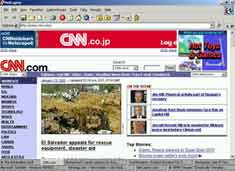
As mentioned earlier, you can open multiple windows within a single NC session. Each window open on a new tab which displays the page title. And are, by default, displayed at the bottom of the screen in a single, scroll able row. You can re-configure them to open in multiple rows at the top or bottom of the screen. To switch between tabs, use the mouse or the Ctrl+Tab shortcut.
An especially useful feature is the tab lock. When enabled, a small lock appears on the tab. Any link clicked on will open in a new tab. The number of open tabs (windows) is dependent on the installed RAM. On most 15" screens at 600x600, more than 30 can clutter the desktop. On my system (P3 with 128 MB RAM and a 17" at 1024x768), I have opened 4 times that number.
Most Net news site refresh themselves at 15-30 minute intervals. If you configure NC's Autorefresh (off by default) you set the interval between 15 seconds and 5 minutes. Or you can stop all sites from loading (Shift+Esc) or refresh all (Shift+F5).
NC also bring you several other productivity shortcuts. IE lets you add "http://" and ".com" using Ctrl+Enter. With Shift+Enter, NC adds ".net" and ".org" with Ctrl+Shift+Enter. You can also redefine these shortcuts to open the domains you most commonly access.
The Popup Captor helps trap the various auto pop up browser windows. Press F8 to add and close a pop up window. Or you can manually add the list of domains to block. StickyNames lets you define a tab name. This title is constant as long as that tab is open. By Default the StickyName displayed is the page title.
If you prefer using the entire screen to view pages, use the FullScreen (F11) option. NC also includes the Flyswat service. This plug-in underlines all the relevant links on a web page. Point the mouse at the highlighted term to view a pop-up menu giving related links. To speed up page load time you should disable the service (enabled by default).
Every new Net user I have introduced to NC raves about the product. Don't you think its time you did too. Download a copy from http://www.netcaptor.com.
G
Menon
[email protected]
Other Articles
ChiefChat
| Mailbox
| NerdWord
| ProductPreview
| SiteScan
| Techtalk
| GameGuide
VirusWatch
| Webware