
Remembering Personals Made Easy
Did you know what the number #3 evil of the Internet is, after viruses and misspelled site addresses? It's those #$%&ing online personals (IDs and passwords) that are now essential for Cyberspace life. To make life infinitely more complicated, rarely do two sites use the same login for user IDs or passwords. You have your email ID as a site ID, or a customised name you created or (worse) a random one generated by the host site. I truly loathe the ones dreamed up by the AOL free disks. But you must give them marks for sheer ingenuity. And
What is this rant about passwords? Well, you now have passwords that use combinations of, or are restricted to, alphabetical characters, numbers, and special characters (that usually can be found in the upper row of your number keys). Privacy advocates argue that without a password just about anybody can access your online persona.
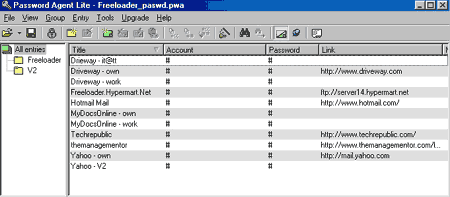 Password
Manager Lite can help you handle all of them. This free utility lets you
organize, and save your various user IDs and passwords. You can organize
your 'collection' by your persona. Or by name; an especially useful feature
when many members of a family share a PC. The software takes some getting
use to. But once you've mastered its quirks its remarkably useful.
Password
Manager Lite can help you handle all of them. This free utility lets you
organize, and save your various user IDs and passwords. You can organize
your 'collection' by your persona. Or by name; an especially useful feature
when many members of a family share a PC. The software takes some getting
use to. But once you've mastered its quirks its remarkably useful.
You can store the account name, login ID, password, the Web site address. And even add a short note about the ID. But what I really like about this utility is its ability to generate passwords. You can use combinations of, or restrict passwords to numbers, upper case alphabets, lower case alphabets or special characters (the ones usually found printed above the numbers on your keyboard).
Even if you don't use Password Manager Lite to open a protected site, it's a great way to store all your passwords in one place. I use Password Agent Lite to store all my passwords, including those for my multiple ISP accounts. And you can choose to display your login and password details in the clear. Or have then encrypted and displayed only as # or *. The master file containing your identities is encrypted too; you need a password to be able to access it. And nobody can help if you forget the file password.
Within each file you can create folders to group your data. However, the details are available in both the root as well as your folder of choice. You can't delete an entry from the root folder and leave it in your sub-folder. It is permanently deleted from both locations. Still, this is better than nothing. Now what is the password I used for Eudora Mail?
Don't let the Lite in the title dissuade you. Yes, there is a "heavy" version. But all you get for a $15 registration fee is the ability to save an unlimited number of IDs and their associated passwords in a single file. The Lite version restricts you to a maximum of 25 in one file. At home, my family has yet to accumulate even 10 different IDs. And there is a work around; if each person maintains a separate file, then you get 25 IDs each! And to prevent one family member from masquerading as another, you can (nay, must) password protect your password (.PWA) file.
If you actually have 25 unique password-protected sites you really do need this utility. But I recommend that your get a life before you are carried off to the funny farm. I also suppose you could let Internet Explorer manage your IDs and passwords. That's fine only if are the ONLY person using to a particular PC. So what are you waiting for, go download your copy now.
G
Menon
[email protected]
Other Articles
ChiefChat
| Mailbox
| NerdWord
| ProductPreview
| SiteScan
| Techtalk
| Tips&Tweaks
VirusWatch
| Webware