
MicroEye ZipOut
 Zip
Up that Email
Zip
Up that Email
On
of the precepts of being polite online is not to send huge file attachments
to other users. This restriction is based on a simple fact: many email
services (and servers) restrict users to a 1 MB Mailbox. This mailbox
usually contains incoming, read and sent email. Despite a quantum jump
in the kind of email formats and the attachments sent, many users are
still restricted in their mailbox size.
So we complain about incoming mail. But ask yourself just how many times have you sent someone a really large file. Now suppose you do practice good email management, and compress your files before attaching them to email. As a user, and doer, this is a pain. You need to first find the file. Then compress it. Then attach it to your message. And finally send it.
 Of
course, compressing attachments means that you can send such email faster.
But we often give up midway because of the tediousness of our actions.
But then there is a free third-party plug-in available for combining multiple
attachments and them compressing them before sending. This means you save
on the bandwidth required to send your email. Plus the space occupied
by your sent email. And you will make the recipient happier; they no longer
need to deal with a 1 MB file attachment.
Of
course, compressing attachments means that you can send such email faster.
But we often give up midway because of the tediousness of our actions.
But then there is a free third-party plug-in available for combining multiple
attachments and them compressing them before sending. This means you save
on the bandwidth required to send your email. Plus the space occupied
by your sent email. And you will make the recipient happier; they no longer
need to deal with a 1 MB file attachment.
Finally we come to the issue of client software. Most readers (based on email feedback) seem to use Outlook Express. I have few issues. This is a good free tool. It's just that its functionality is quite limited; especially in comparison to its big brother Outlook 2000. Most of us use either Office 97 or 2000. And Outlook comes bundled with both. If you don't use the full-bodied version, I'm making a case to begin. You can do so much more. All you can't do is access your Hotmail Inbox directly.
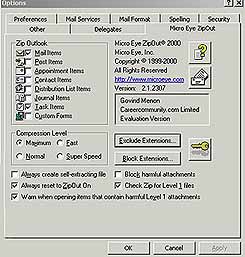
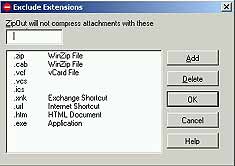
But were you to use Outlook, then your mail management woes will be over. Install the nagware ZipOut plug-in (2 MB, Windows, requires Outlook 98/2000) for on-the-fly compression of attachments. The utility can also be configured to compress as .ZIP or .EXE (self-extracting) attachments. Now suppose you receive an email with a .ZIP attachment and you don't have WinZIP installed. ZipOut includes a Zip file viewer. ZipOut can compress attachments in all items in a folder or sub folders, remove HTML stationery, or delete attachments from a selection of messages. You can also schedule automatic attachment compression in your mailbox based on a single or recurring Outlook task. And suppose you haven't installed the Microsoft Outlook E-mail Security Update. Don't worry, ZipOut provides its own attachment blocking security for certain potentially malicious file types. It also warns if .zip files contain potentially harmful files. Best of all, you can edit the list of file types for exclusion.
I have been using ZipOut for a while now. And am really satisfied with the results. I hope my email recipients are too as they no longer need to deal with large attachments. Or multiple files; everything is in one single file. To improve compression, I keep it set at maximum. This utility can also compress every component of Outlook 2000, including Appointments, Contacts and the Journal (which tracks file access). Available as a unlimited nagware trial (nagware = prompts for a license key every time you use it). So what are you waiting for; download a copy today from http://www.microeye.com/zipout/index.html