
Chat Away for Less
Did you know you could use a computer to make free phone calls to friends in foreign lands? Or even call them on their PC and then speak instead of type. Officially, you didn't read it here. We don't want the various state-owned entities breathing down our necks as Internet telephony is still part of the Indian Net experience's underbelly.
 However,
elsewhere in this issue we list some of the better Net telephony sites.
This is a basic guide to help you configure your PC for Internet Telephony.
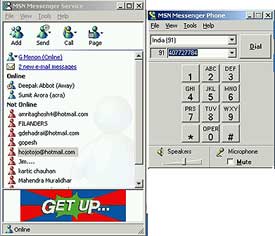
You can also use the MSN Messenger service to call any telephone,
mobile device or another computer located within the United States or
Canada. This service is provide by Net2Phone.
However,
elsewhere in this issue we list some of the better Net telephony sites.
This is a basic guide to help you configure your PC for Internet Telephony.
You can also use the MSN Messenger service to call any telephone,
mobile device or another computer located within the United States or
Canada. This service is provide by Net2Phone.
MSN Messenger is incredibly easy to use. All you need to do is download a copy (http://messenger.msn.com) and install it. Then add your details. It helps if you have an existing Hotmail user ID. We tested out the MSN Net2Phone service. Voice quality was moderate and we could call number in the US and Canada for free. Attempts to call a number outside the US, prompted a message that our account balance was nil and we needed a minimum of $25 to begin talking. The rates offered were a low $0.49 (Rs 23) per minute.
MSN Messenger permits you to change your identity from minute to minute, instantly block specific users from messaging you or display a courtesy notice that you are away from your computer while you work without interruption. And you can use a single client for voice and text call (other users need to be on MSN). You can also send and receive file attachments with your instant messages. The service also updates you about any unread messages in your Hotmail account.
Yahoo Messenger too supports PC-to-PC voice chat. However remember always not to even attempt it on VSNL or a public-sector ISP. It's illegal. However, some private ISPs allow Internet telephony. If you have a bad experience, email us giving the name of the ISP, your modem name and type and computer configuration, and the time you tried a voice call.
To take advantage of Internet telephony, your computer need a full-duplex sound card, a speaker, microphone and preferably a full-duplex modem with a minimum speed of at least 28.8KB. Full-duplex allows simultaneous conversation (just like a local phone call) between yourself and the person you call. From experience we have found that several PCs that only offer half-duplex in Windows 98 miraculously go full-duplex when you install Windows 2000!
If you do not use a full-duplex sound card, your PC-to-telephone call may seem like talking on a bad radio link; complete with hiss, crackling noise and voices that fade in and out. Also each person has to wait for the other to finish talking before beginning to talk. It often helps to say "over" after completing a sentence.
You may also notice an audible echo. This is caused by using a microphone with speakers. Some amount of echo can be eliminated if you use a good headset.